How to Create a SaaS Product Demo That Converts Visitors into Customers
A SaaS demo converts when a visitor recognizes their own job and sees it finished. It does not convert because the product has many features, or because the founder narrated all of them. Most demos on landing pages fail in the same way. They are tours. The visitor wanted a reason to believe the product does the one thing they came for, and they got a map of the settings page.
This is for founders and product marketers who need a video for a homepage, a launch, or a social post. The structure is short. Name the customer. Show the problem as they experience it. Show the product removing that problem. Ask for one action. Then stop.
Name the customer before you touch the product
"Anyone who uses software" is not a customer. A converting demo is for someone specific: the founder who has to ship a homepage video this week, the marketer who records the same changelog every month, the support lead who is tired of writing the click path in text. Pick one. Write their sentence. "I need a product video that shows the click, and I do not have an editor on the team."
If you cannot picture where they will watch, you will make the wrong length. A homepage visitor gives you a few seconds of attention beside a headline. A launch-day viewer on a social feed gives you even less, and often with the sound off. A sales follow-up can be longer, because the person asked for it. One recording rarely serves all three. Make the homepage cut first. It is the one that has to work with no patience and no audio.
The customer sentence also decides which feature is allowed in the video. If the customer is a founder making their first demo, the shot is the zoom onto the button and the export. The caption settings, the webcam bubble, and the affiliate program are real, and they are not this video. Save them for a page that person will open after they care.
Start on the problem, not on the logo
Before: the demo opens on a logo sting, a founder saying the company name, and a slow pan across an empty dashboard. Thirty seconds in, nothing has gone wrong and nothing has been fixed. The visitor still does not know if this product is for them.
After: the first frame is the painful moment, in the customer's own interface. For a screen recorder, that moment is a product video where the click is invisible. The window is the whole desktop. The pointer is small. The number that matters is too small to read. You do not need to insult the viewer's current tool. You need them to feel the miss. "Which button did they press?" is the problem. Say it in one line, or show it by letting the bad frame sit just long enough to be annoying.
Keep that opening under fifteen seconds. A problem statement that turns into a memoir about how you started the company is a different video. The visitor can read the about page later. Right now they are deciding whether to stay.
Use their words. If they say "our demo looks like a Zoom recording," do not translate that into "suboptimal motion design." Repeat their phrase, then show the contrast.
Show one job getting done
The middle of the demo is a single task, completed. Not a list of capabilities. A task has a start state and an end state the viewer can check.
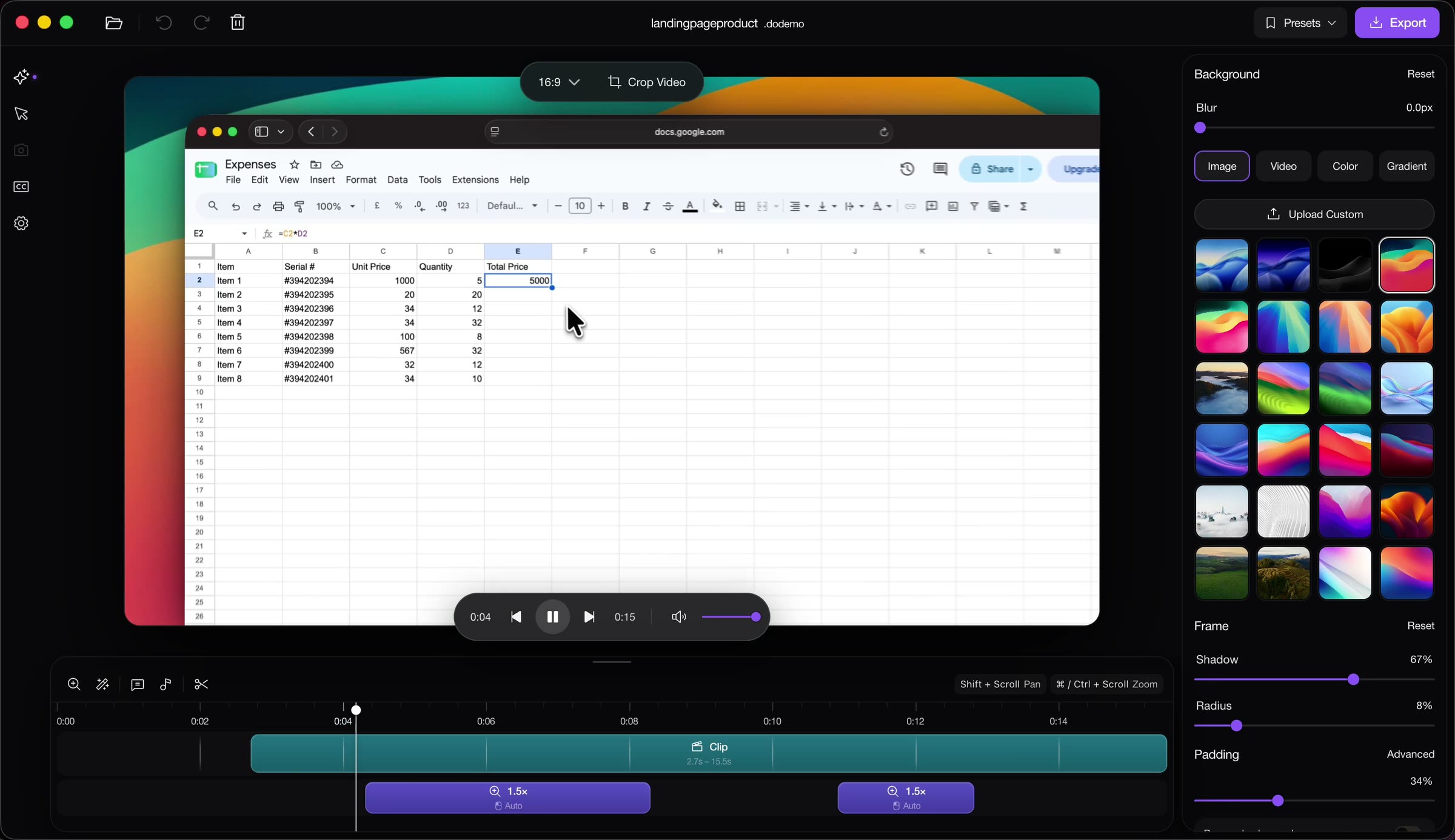
For DoDemo, a true task is: record a spreadsheet, and make the edited cell readable. The start state is the sheet. The end state is the total, 5000, large enough to read, with the cursor on that cell, and the take sitting in a frame you could put on a homepage. The editor screenshot at the top of this article is that end state. The spreadsheet is the product being demonstrated. The timeline shows two automatic 1.5× zooms. The background, shadow, and padding are already applied. A visitor does not need a tour of every knob to understand what changed. They can see the cell.
Narrate the task as cause and result. "The click lands on the total. The zoom follows. The cell is readable." Then the export. If you are tempted to add "and you can also do captions, webcams, and backgrounds" in the same breath, you are leaving the task. Those are real. They belong in a second video, or in a single extra shot if one of them is the customer's actual problem. A marketer who needs captions for a muted homepage gets a captions shot. A marketer who needs the click to be visible gets the zoom. Do not give both people a video that fully serves neither.
Time the middle. If the task takes ninety seconds on a real account, the demo of it should not take six minutes. Cut the login if login is not the product. Cut the loading. Cut the moment you looked for the menu. The visitor's patience is the scarce resource. Spend it on the change from problem to result.
End on one action
Before: the video fades out on the dashboard. The founder says "thanks for watching" or "let me know what you think." The visitor agrees the product looked nice and has nowhere to go. The tab closes.
After: the last line is a verb you want from this audience, and the picture still shows the result. "Download it and record the click you have been trying to show." "Start the trial on the plan you actually need." One action. The button on the page next to the video should be the same action. If the video says "book a demo" and the page says "buy now," you have split the visitor in half.
A call to action is not a list of every door into the company. It is the door that matches the customer you named at the start. A founder who needs a homepage video should be sent to download DoDemo, not to a general contact form, unless talking to you is the real next step. Pricing can be the action when the video was about cost. The pricing page is the right ending for a video about plans. It is the wrong ending for a video whose job was to prove the zoom works.
Say the action once, at the end, in the same words as the button. Repeating three different asks is how a clear demo becomes a trailer.
The mistakes that keep a good product from converting
Showing too many features is the common one. Each extra feature is a bet that the visitor's problem was broader than it is. Most of the time it was not. They came to see one change. The fifth feature teaches them that your product is busy, which they interpret as hard. A demo that converts feels short because it refused the other nine things the product can do.
Length is the other one. A twelve-minute demo can be right in a sales call where someone booked the time. It is wrong as the hero of a landing page, and it is wrong as a launch post where the viewer can flick away. If you already recorded twelve minutes, do not upload twelve minutes and hope the landing page will forgive you. Cut a version that is the task only. Keep the long file for the call.
Other misses are quieter. A demo that starts after the product is already configured hides the work the visitor is afraid of, and then they feel tricked when setup is real. A demo that only shows setup never reaches the result, so they never want it. A demo recorded on a staging account full of "test test test" rows looks unfinished, and people assume the product is unfinished too. Use sample data that looks like a small real business: a short name, a plausible number, no private customer information.
Do not mock a competitor for a full minute. The visitor did not come for that. A three-second contrast is enough if the contrast is visual: the cell too small to read, then the same cell after the zoom.
Different cuts for the landing page, the launch, and social
The landing page cut is the task and the action. Wide enough to embed beside the headline. Captions on, because many visitors never unmute. The result frame should make sense if they only watch ten seconds in the middle.
The launch cut can have one extra sentence of context, because the audience asked what is new. It still should not be a changelog read aloud. One new capability, shown as a task, then the same action you want that day: try it, or upgrade.
The social cut is the problem and the result, almost nothing else. Square or vertical if that is where you post. The zoom has to read on a phone. The cursor has to be large. The ask is in the caption of the post as well as in the last second of the video, because the platform will crop your ending.
You can record once, carefully, and cut three ways if the original window was large and the task was singular. You cannot record a wandering tour and crop three converting videos out of it. The structure has to be in the take.
How founders actually produce this with DoDemo
DoDemo is a screen recorder and editor for Mac and Windows. You record the screen, your voice, and a webcam if you want your face in the launch post. The file stays on your computer until you export. There is no upload step between the take and the edit, which matters when the demo contains a product you have not announced.
Record the task. Stop. You are already in the editor. DoDemo builds zoom regions from the cursor and the clicks, so the cell or the button you used becomes the shot without you hand-keying every scale. Retime a zoom if it arrives early. Draw one yourself if the automatic pass missed the control you care about. Smooth the pointer so it does not jitter on the pricing button. Put the window on a background and set the padding so the landing page is not a raw desktop. Generate captions for the muted cut. Hide the recorder's own controls so the demo is of your product, not of the tool you used to film it.
Export MP4 for the page and the launch. Export a short GIF when a single step should sit inline in a post. The spreadsheet project in the picture is the shape of a converting demo: one interface, one result, zooms on the timeline, a frame you would not be embarrassed to put under a headline.
Then put the file next to one button. If the video did its job, the visitor knows what will happen when they press it. If you still feel you should add a second feature "just so they see the breadth," make that a second, shorter video further down the page. Do not put it in the one they see first.