
Raw Screen Recording vs. Polished Product Demo: What's the Difference?
A raw screen recording and a polished product demo can start from the same clicks. They do not feel like the same video. The raw file is a document of you working: every hesitation, the full desktop, a pointer that is hard to see. The polished file is an argument: this is the action, this is the result, and nothing else is in the way.
Founders, developers, and content creators need both. Sending a polished demo to a teammate who asked "what broke?" wastes time. Putting a raw recording on a homepage wastes the visit. The difference is not taste. It is clarity, pacing, the cursor, the zoom, the frame, and what the viewer is able to do when the video ends.
What you are actually comparing
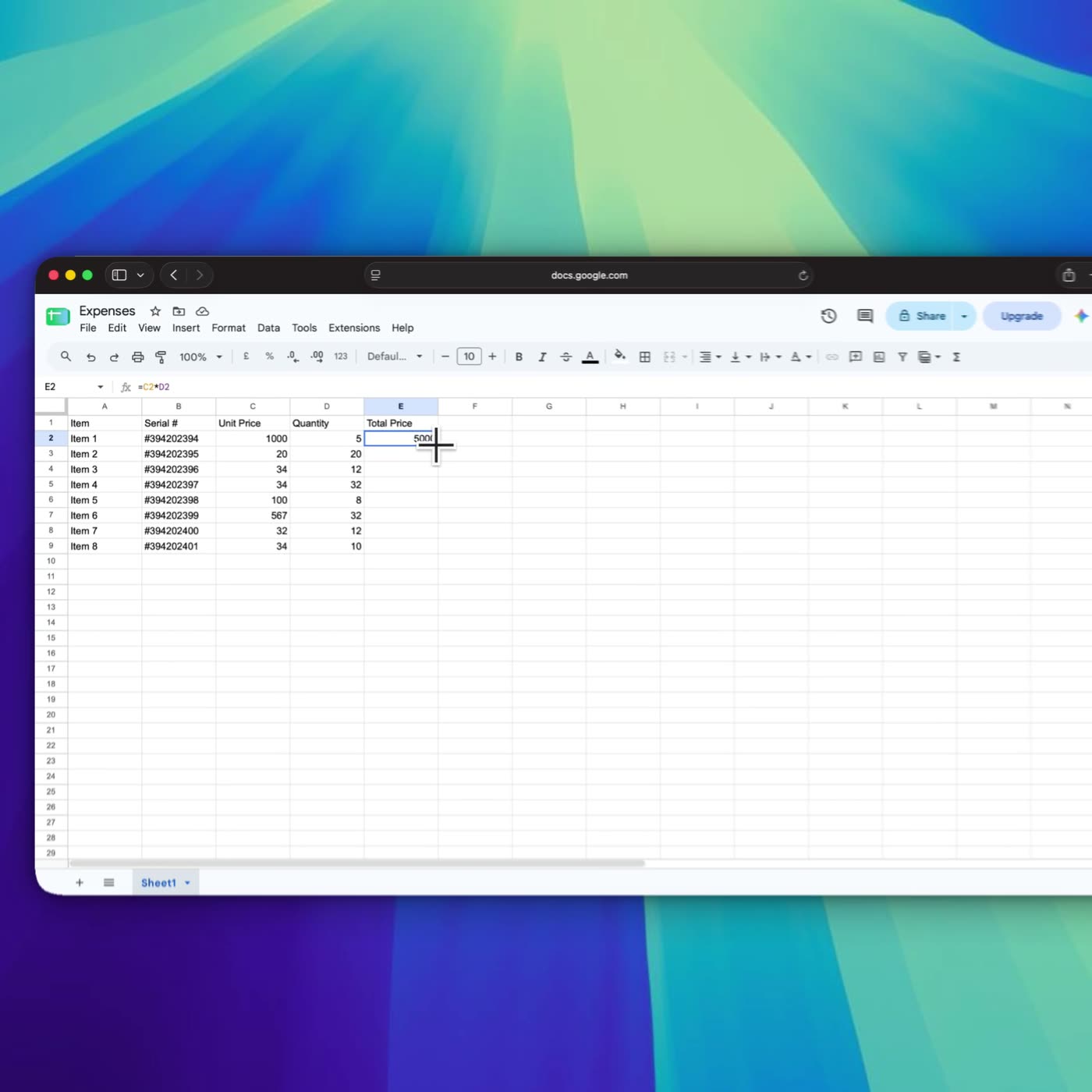
Take a spreadsheet edit. Someone changes a quantity, and a total becomes 5000.
The raw version is the whole display. The sheet is one window among others. The pointer darts, settles in the wrong cell, corrects itself, and the number changes while you are still talking about something else. The viewer can reconstruct the edit if they care and if they rewind. Many will not.
The polished version is this frame from a DoDemo recording. The zoom is on the Total Price cell. 5000 is large enough to read. The cursor is on that cell, not wandering the grid. You can see the quantity next to it, so the cause and the result are in the same shot.
That pair is the comparison. Same kind of task. The raw file makes you hunt. The polished file points. There is not a single split-screen file of one take playing both ways, because a raw capture and a finished export are two stages of one project, not two cameras. The frames below are the finished stage. The raw stage is what you had before the zoom, the crop, and the trim.
Clarity
Clarity is whether a stranger can name the control you used. In a raw recording, clarity is accidental. It happens if you happened to click slowly, in a window that happened to be large, with a cursor that happened to be visible against that background. Change any of those and the click becomes a rumor.
In a polished demo, clarity is built. The window is the frame. The pointer is large and it rests before the click. The zoom arrives on the control and leaves once the result is visible. Captions repeat the name of the button for anyone watching without sound. You can pause at random and still answer "what is this shot showing?"
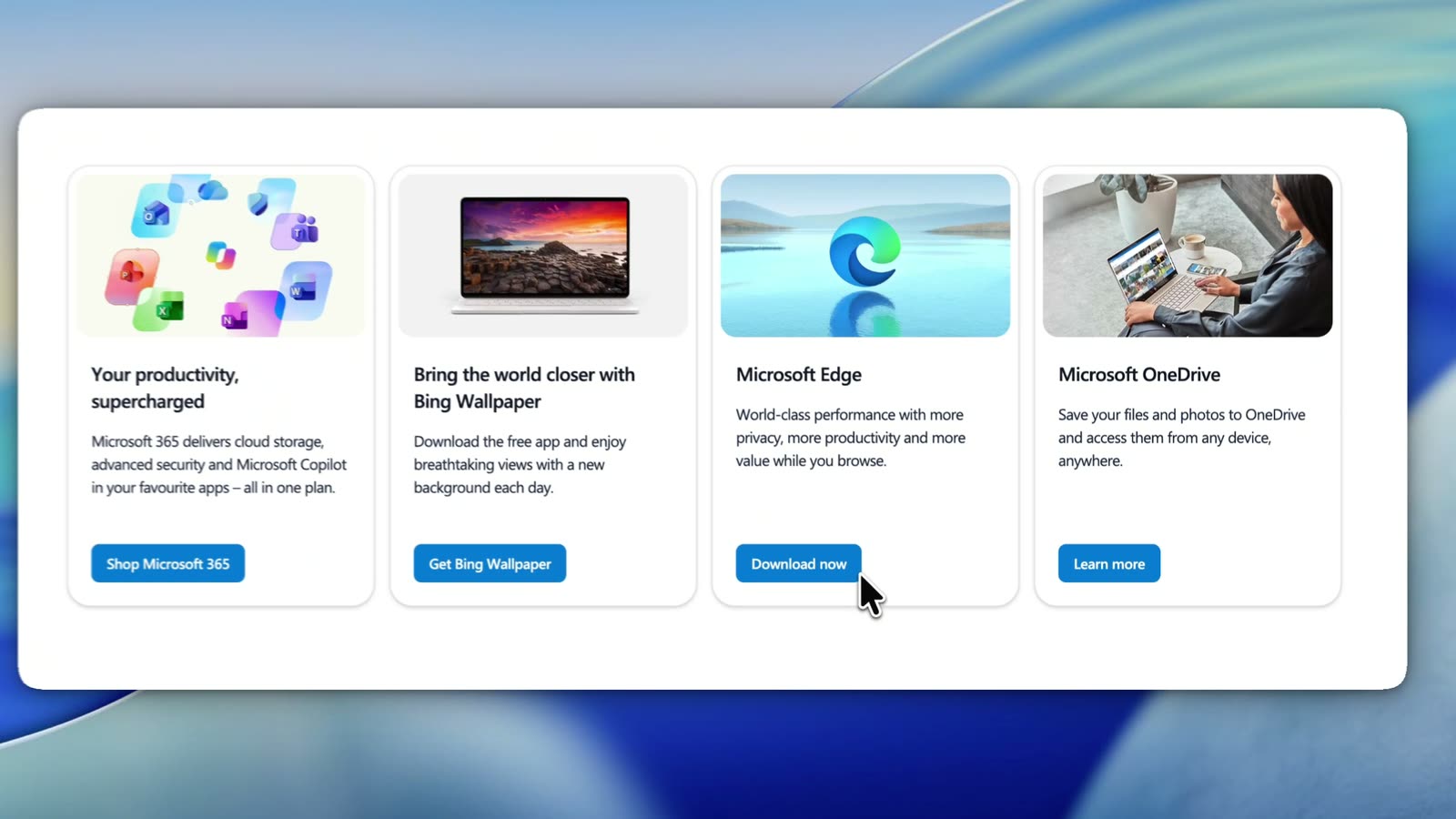
A second real frame, from another DoDemo recording, is the same idea on a marketing page. Four cards would be small type on a full desktop capture. Here the type is readable, and the cursor is parked on Download now. Nobody has to ask which button was the subject.
If your raw recording cannot pass the pause test, it is not "authentic." It is unfinished. Authenticity is allowed to be clear.
Pacing
Raw pacing is the speed of your thinking. You scroll, you pause, you try a menu, you go back. That pace is honest, and it is also why raw videos run long. A two-minute task becomes eight minutes of arrival.
Polished pacing is the speed of the task. The hesitation is trimmed. A correct step that was merely slow can play a little faster. DoDemo has trim on the timeline for the parts that should not ship, and a Speed control for the parts that are right but leisurely. The viewer experiences a sequence of actions, not a sequence of decisions about actions.
Pacing is also the gap between your voice and the screen. Raw narration often lags, or runs ahead, because you are discovering the sentence while you click. A polished demo says the action, does the action, and shows the result, then stops. Silence between steps is fine. Rambling between steps is how pacing dies.
The cursor
In a raw recording the cursor is a system arrow having a private conversation with the interface. It circles. It rests on labels you are not choosing. On a compressed social upload it can vanish entirely, and the video becomes a series of unexplained screen changes.
In a polished demo the cursor is a graphic you are responsible for. It moves in a line you could defend. It stops on the control. The click reads. DoDemo smooths the raw track so the pointer glides instead of jittering, and it can show the click without a trail that fights the UI. You can turn the motion down until a serious tutorial feels steady, or leave a little life in a launch video. The goal is not a cartoon mouse. The goal is that the viewer never loses the point of contact.
If you hide the cursor to "look clean," you have removed the only proof of what was clicked. Hide the wandering. Keep the arrival.
Zoom
A raw recording is usually one scale: whatever the monitor was. Everything is equally important, which means nothing is. Dense products, spreadsheets, IDEs, and admin tables, punish that choice. The result and the decoration are the same size.
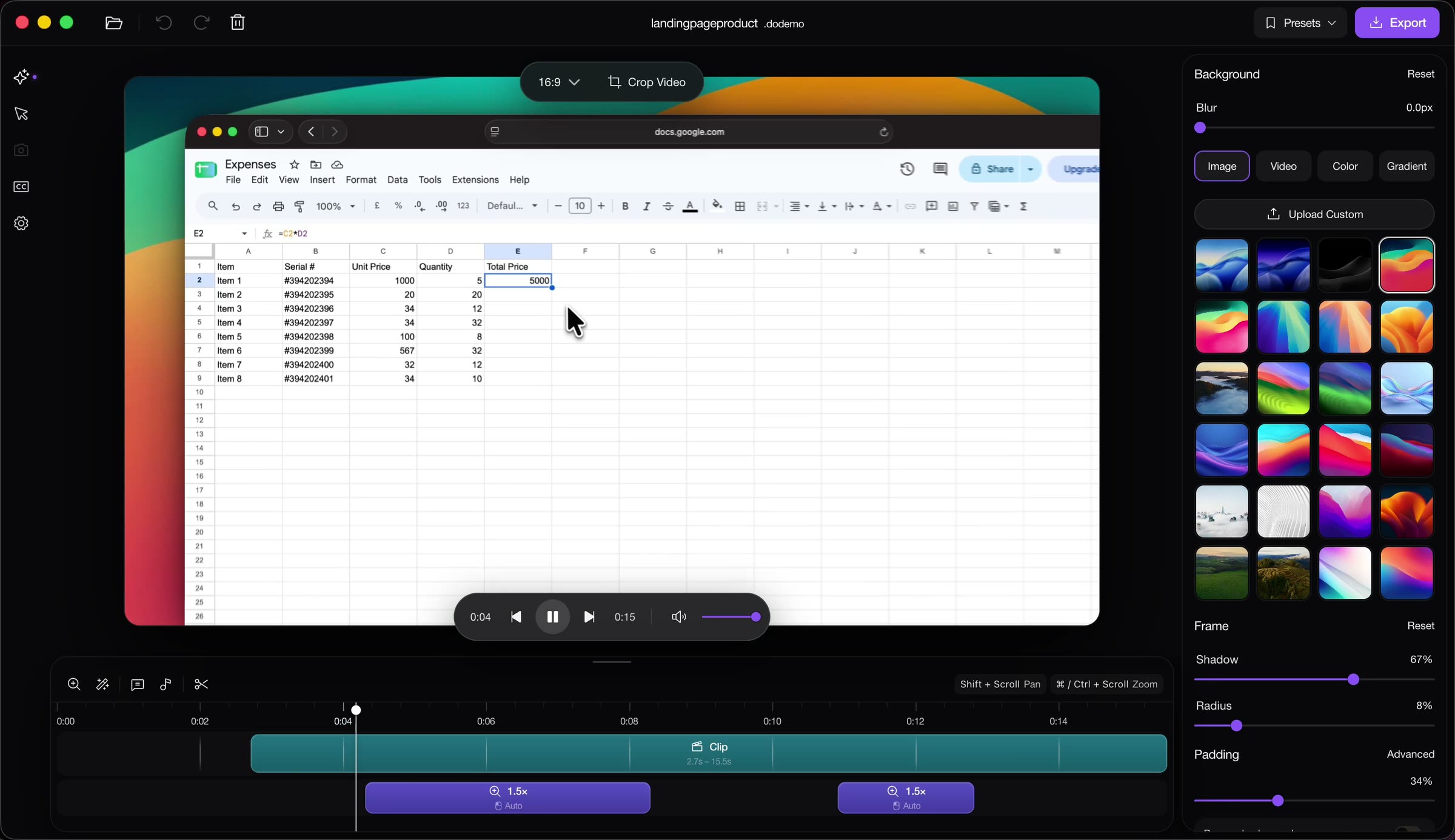
A polished demo changes scale on purpose. Zoom in for the result. Zoom out for the map. DoDemo builds zoom regions from the cursor and the clicks, recenters when the pointer nears the edge, and lets you retime those regions or draw your own from 1.5× in a modest case up to 5× when a label is still too small. The spreadsheet timeline in the editor frame uses automatic 1.5× regions. That is a real edit, not a slogan. You can see the regions. You can move them if the zoom talks before the click.
A zoom that stays in forever is its own kind of rawness. The viewer learns the cell and cannot find the cell later. Come back out.
Visual presentation
Raw presentation is the desktop you happened to have: a messy menu bar, a personal wallpaper, a notification, the recorder's own toolbar in the corner. None of that is evil in a working session. All of it is noise in a video you are asking a customer to trust.
Polished presentation is a frame you chose. The product window, padding around it, a background that does not fight the UI, a shadow that separates the window from that background. DoDemo's editor exposes those as background, blur, shadow, radius, and padding, next to the preview. Crop Video is there when the capture included a strip of desktop you do not want. The recorder's own heads-up display can stay out of the shot, and a countdown can run before the file starts, so you are not trimming your own tool out by hand.
Presentation includes your face only if your face helps. A webcam bubble is right for a launch where people want a person. It is clutter on a silent homepage loop of a single click. DoDemo lets you add the camera, mirror it, crop it, and park it in a corner. It also lets you leave it out. Polished does not mean decorated.
What the viewer walks away with
After a raw recording, a generous viewer has a vague sense of the product and a list of questions. Which menu was that? Was the second click a mistake? Is the result the number or the dialog that flashed afterward? They may still like you. They cannot repeat the task.
After a polished demo, they can say the step. They saw the control, the click, and the result at a size that survives a phone screen. They know what you are asking them to do next, because you did not spend the last minute touring settings. The video respected their time, which is the only credibility a cold visitor can check.
That is the commercial difference, and it is also the teaching difference. A developer sending a bug to a teammate wants the raw questions preserved: the error, the wrong state, the exact second it failed. A founder sending a homepage video wants those questions already answered. Same clicks. Different duty to the viewer.
When the raw file is the right file
Send the raw recording when the viewer shares your context and needs the unedited truth.
A bug report to someone who has the repo open. A pull request where the reviewer must see the failure, including the messy part. A customer call you are logging for yourself, not publishing. A first capture you will edit later, saved so you can trim with the original still in hand. A status update to a cofounder who asked "show me where it breaks" and will watch at 2× anyway.
In those cases polish can be rude. Trimming the mistake hides the bug. A background and a zoom can crop away the console line they needed. Leave the cursor small if the point is a full-screen layout bug that a zoom would conceal. Match the file to the question. The question "what happened?" wants raw. The question "what should I believe this product does?" wants polish.
Raw is also the right starting point, always. You cannot polish a take you do not have. Record the real session locally. DoDemo keeps that file on your machine. Edit a copy into the demo. Keep the raw one for the day the polished cut turns out to have dropped a step.
When the polish is worth the time
Polish the video when a stranger will see it, or when a teammate will have to follow it without you in the room.
A homepage. A launch post. A social ad. A help article that replaces a meeting. A sales leave-behind. A course lesson. An App Store preview. Anywhere the viewer cannot ask "which button?" and get an answer in the next ten seconds.
The effort is not a full post-production house. On a take that was prepared, polish is: trim the false start, keep or nudge the automatic zooms, smooth the pointer, crop the junk, set a background if the desktop shows through, add captions if the page is muted, export. That is an afternoon the first time and a much shorter pass once it is habit. It is worth more than another paragraph of homepage copy, because the visitor can check it with their eyes.
Skip polish when it would falsify the thing you are showing. Do not speed up a performance claim. Do not zoom so tight that a loading state disappears. Do not trim the error out of a troubleshooting video whose whole point is the error. Polish is selection and emphasis. It is not a different product than the one you recorded.
A simple rule
If the viewer already knows you and needs the facts, send the raw recording and label it as raw. If the viewer does not know you and you want them to act, send the polished demo and make the action obvious. DoDemo is how that second file gets made without leaving the machine where you recorded the first: zooms from the cursor, a pointer that stays visible, trim and speed on the timeline, a frame and a background, captions if you need them, then MP4 or GIF. Download it for Mac or Windows. The pricing page is there when you are ready to choose a plan.
Watch both versions of your next take, once. The raw one will show you what you actually did. The polished one will show you what you were willing to ask someone else to watch. Publish the second when the audience is a customer. Keep the first when the audience is you.